


Understanding the Current Integration Stack
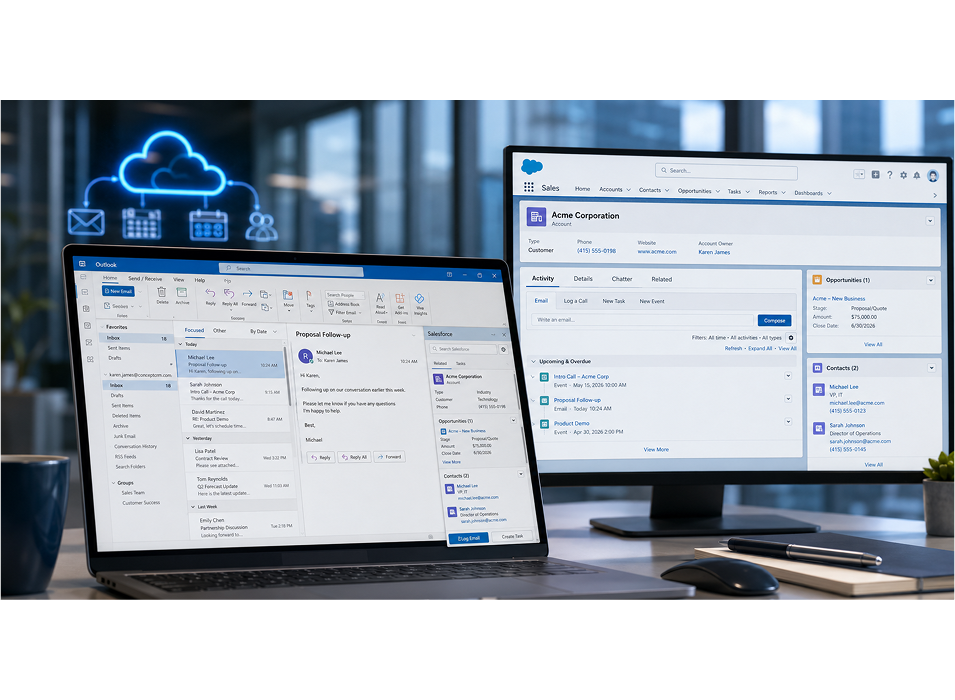
Many prospects still think “Salesforce for Outlook” is the answer. The current recommended stack is different, and it matters for rollout, data storage, and reporting.
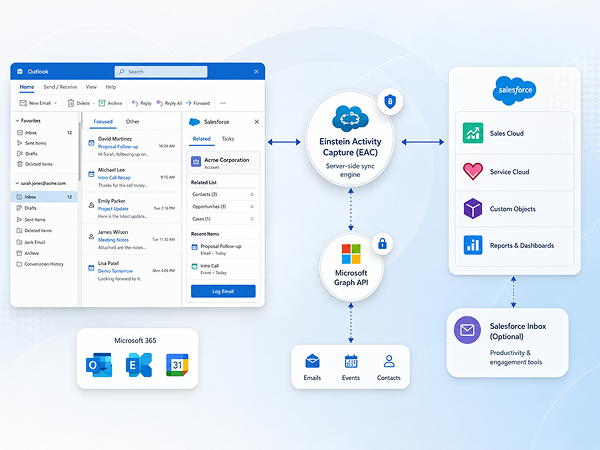
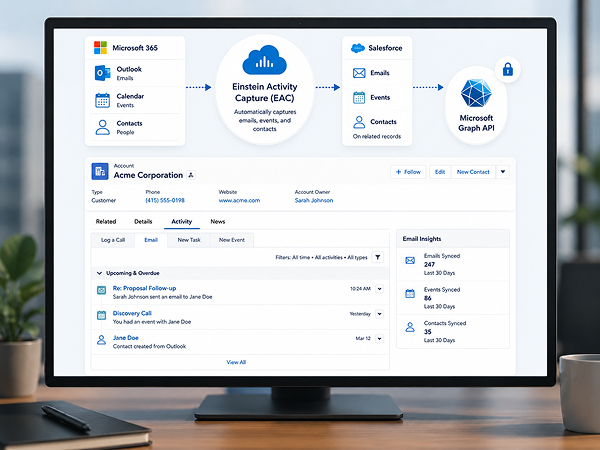
The modern Salesforce Outlook integration stack includes:
-
Outlook Integration (Salesforce add-in for Outlook): the Salesforce side panel inside Outlook
-
Einstein Activity Capture (EAC): the server-side sync engine for emails, events, and contacts
-
Salesforce Inbox (optional): productivity and engagement capabilities layered on top
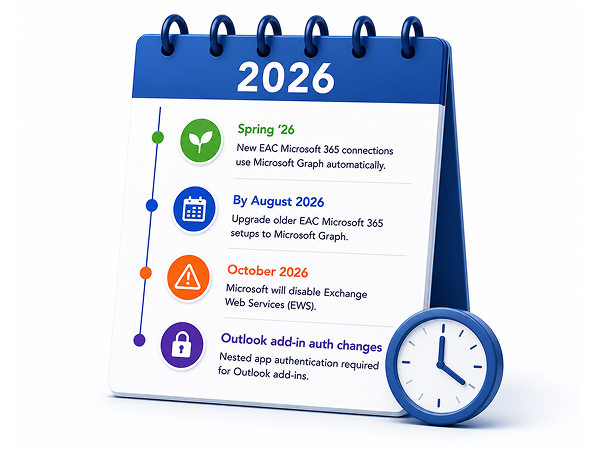
Started Spring ’26, EAC connections to Microsoft 365 authenticate via Microsoft Graph automatically. If your org was set up before Spring ’26, Salesforce recommends upgrading to Microsoft Graph by August 2026 to avoid disruption
Working in Salesforce from Outlook
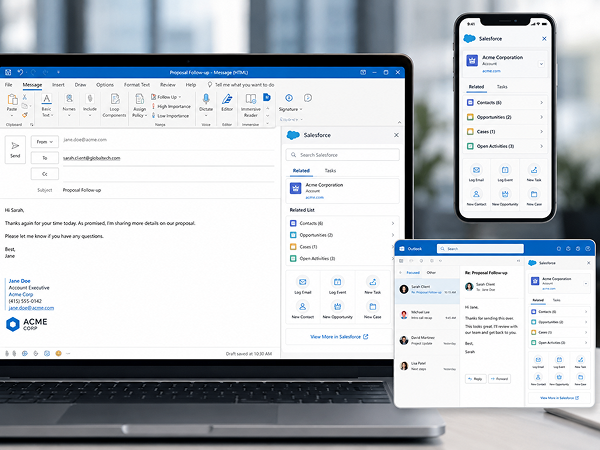
The Outlook add-in brings Salesforce context into the inbox, so reps can take action without switching tools.
Common capabilities we enable:
- Search and browse Salesforce records inside Outlook
- Create new Salesforce records, including custom objects
- Log emails and appointments to Salesforce records in one click, including while composing
- Use Salesforce email templates from Outlook
- Create and manage Salesforce Tasks from Outlook
- View related contacts, leads, accounts, opportunities, and cases associated to emails and meetings
- Support across Outlook desktop, web, and mobile
Data Storage And Reporting Considerations
EAC decisions are not just technical. They affect compliance, reporting, and long-term data ownership.
Key planning points:
- Where email data lives: EAC can surface activity without storing every email as a standard Salesforce record, which can limit native reporting depending on your requirements.
- Graph upgrade is irreversible: Salesforce notes that after upgrading an EAC connection to Microsoft Graph, you cannot roll back to EWS.
- EWS retirement pressure: Microsoft has announced EWS will be disabled in Exchange Online in October 2026, accelerating the need to migrate integrations to Microsoft Graph.

Salesforce Inbox (Optional) For Productivity and Engagement
Inbox is a separate add-on license that can improve speed and follow-through for teams that need more than basic logging.
Inbox can enable:
- Faster scheduling and meeting booking
- Email engagement insights and notifications
- Send-later and timing features
- Snippets and common phrases for consistent messaging
- Salesforce context in Outlook, including relevant records and supported custom objects
We help you decide when Inbox is worth it and when the standard stack is enough.

Creating Statements of Work and Bespoke Agreements
EAC supports two-way calendar and contact sync for Microsoft 365, replacing older sync approaches as Microsoft deprecates legacy methods.
What we configure and validate:
- Two-way calendar sync behavior and meeting logging rules
- Bi-directional contact syncing and duplicate prevention
- Handling for recurring meetings, attendees, and invite processing
- Visibility and sharing settings so activity appears where it should, and nowhere it should not

Customizing the Outlook Side Panel by Role
Not every user needs the same Outlook experience. Adoption rises when the panel matches the job.
Concept can tailor the integration to your org by:
- Building different panes for different teams (sales, CS, account management)
- Surfacing the right custom objects, custom fields, and related details
- Configuring profile and permission set based access to features
- Simplifying layouts for teams that do not need tracking or advanced tools

Workflow Automation Between Outlook Activity and Salesforce
Once Outlook activity is captured and associated correctly, you can automate the follow-up and pipeline updates that sales ops usually chase manually.
Examples we implement:
- Trigger Salesforce Flows from email or meeting activity
- Auto-create follow-up tasks when meetings are booked or emails are sent
- Update opportunity stages or lead statuses based on defined engagement events
- Feed clean activity signals into dashboards for managers and leadership
Critical 2026 Deadlines and Migration Considerations
This is where many orgs get surprised, because it spans Salesforce setup and Microsoft 365 tenant governance.
Deadlines and changes to plan for:
- Spring ’26: New EAC Microsoft 365 connections authenticate with Microsoft Graph automatically.
- By August 2026: Salesforce recommends upgrading older EAC Microsoft 365 setups to Microsoft Graph to avoid disruption.
- October 2026: Microsoft will disable Exchange Web Services (EWS) in Exchange Online.
- Outlook add-in authentication shifts: Microsoft recommends nested app authentication for Outlook add-ins that relied on legacy Exchange tokens.
Concept helps coordinate the real-world owners across Salesforce admin, Microsoft 365 admin, and security, so the project does not stall at tenant consent and authentication.
Known Limitations We Address Up Front
Common limitations and tradeoffs:
- Reporting constraints if email activity is not stored as standard Salesforce objects
- Engagement signal visibility can vary by tooling and workflow expectations
- Data continuity planning for departed employees and historical activity retention
- Storage growth if you choose approaches that write more data into Salesforce records
- Custom object and edge-case behavior that requires validation in your environment
We document these early, then design the configuration and operating model around your requirements
Deployment and Configuration Requirements
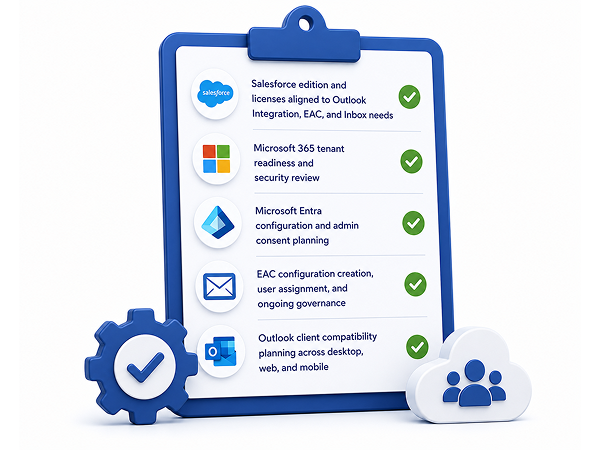
A successful rollout requires coordination across Salesforce, Microsoft 365, and identity.
Typical requirements include:
- Salesforce edition and licenses aligned to Outlook Integration, EAC, and Inbox needs
- Microsoft 365 tenant readiness and security review
- Microsoft Entra configuration and admin consent planning
- EAC configuration creation, user assignment, and ongoing governance
- Outlook client compatibility planning across desktop, web, and mobile




HubSpot Hubs Support


|
|
 |
 |
CMS Hub |
Operations Hub |
Commerce Hub |
| Empower your marketing and development teams with a CMS that offers flexibility, security, and personalized customer experiences. | Maintain clean, curated customer data and automate business processes for a unified view of customer interactions, delivering seamless experiences. | Streamline your commerce operations with robust tools for billing, subscriptions, and revenue collection, integrated seamlessly with your CRM. |